

Harvest Night Cooling
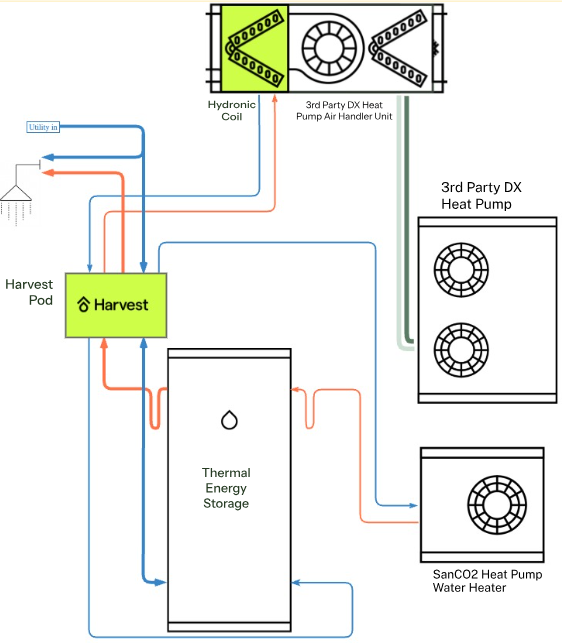
Night Cooling is Harvest’s name for bringing filtered outside air into the home when desired. This filtered outside air can be used to:
- cool the home when the outdoor temperature is lower than the indoor temperature,
- improve indoor air quality with filtered air, and without having to open windows. This can be beneficial after cooking or if CO2 and VOC levels are high due to lack of ventilation.
Bringing in filtered outside air is accomplished by combining the controls from the Ecobee Premium or Ecobee Enhanced thermostats with the damper built into the air handling unit and an outside air intake vent and duct.
The thermostat provides several different ways to manually and automatically control when filtered outside air is brought into the home:
Manual ventilator control, with an automatic turn-off after 20 mins
The ventilator can be turned on or off manually at any time by going to:
- Main Menu Hamburger menu icon > Fan & Ventilator icon .
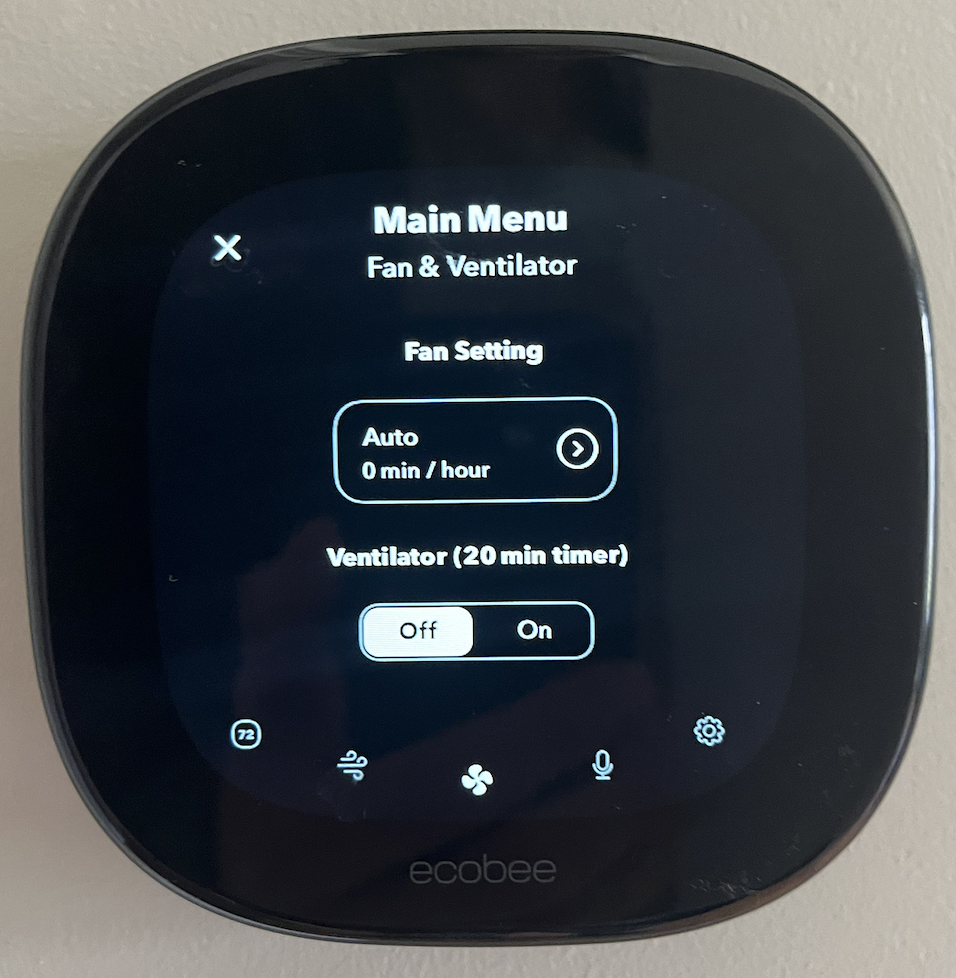
In this menu, you can turn the Ventilator on for 20 minutes, bringing in outside filtered air. You can also turn the Ventilator off if it is running for any reason. In addition, from this location, you can also control the Fan Setting, which will recirculate the air within your home through the filter.
Automated ventilator runtime of x mins per hour
Automated runtime of the ventilator from 5 mins to 55 mins per hour can be accomplished by going to:
- Main Menu Hamburger menu > General Settings > Settings > Installation Settings > Equipment, then Ventilator. (actual names may vary for Android vs. iPhone)
- Set the Occupied Min Runtime to the desired time per hour that the ventilator will run.
- The Occupied Min Runtime will be active when the Home and Sleep comfort settings are scheduled
- The Unoccupied Min Runtime will only be active when the Away comfort setting is scheduled
Automated Night Cooling (a.k.a. free cooling)
During evenings and nights in the summer, the outside air can often be cooler than the air inside your home. If your Ecobee thermostat detects this and your system is calling for cooling, whether you have active cooling via an A/C or not, your thermostat can activate free cooling. This will bring in the cooler air from outside to cool the home instead of running the A/C.
If you have an A/C or heat pump A/C unit
-
There are four relevant settings, adjust them on the thermostat by going to the Main Menu Hamburger menu > General Settings > Settings > Installation Settings > Equipment > Ventilator:
Ecobee Setting Suggested Value Free Cooling Max Outdoor Temperature Same as cooling setpoint for Home comfort setting Indoor/Outdoor Temperature Delta 1°F or higher Free Cooling Max Outdoor Humidity Disabled Max Set Point Temperature Delta 2°F or higher
If you only have Night Cooling
Night Cooling works in the evenings and overnight when the outdoor temperature drops due to the natural weather patterns.
Set up an “Evening” comfort setting to focus free cooling on the right time of day.
- On the Ecobee Mobile App (this cannot be done on the thermostat directly):
- Tap Home > Thermostat > Menu , then Comfort Settings
- Tap the sign
- Name the Comfort Setting “Evening”, then adjust the setpoints like this sample schedule:
- On the Ecobee Mobile App (this cannot be done on the thermostat directly):
Change Ventilator settings on the thermostat.
Go to the Hamburger menu > General Settings > Settings > Installation Settings > Equipment > Ventilator:
Ecobee Setting Suggested Value Free Cooling Max Outdoor Temperature Same as cooling setpoint for Evening comfort setting Indoor/Outdoor Temperature Delta 1°F or higher Free Cooling Max Outdoor Humidity Disabled Max Set Point Temperature Delta 10°F or higher
To turn Free Cooling on or off:
Section titled “To turn Free Cooling on or off:”- Hamburger menu > General Settings > System > Ventilator, then select Enable or Disable under Free Cooling
Automated Air Quality control
Automated Air Quality control is a feature of the Ecobee Premium thermostat and can be turned on and off by going to:
- Main Menu Hamburger menu icon > General Settings icon > Settings > Air Quality Monitoring then Enable or Disable
The thermostat estimates the indoor air quality based on the range of air quality it has seen in the home over the past four days. During the spring and fall, we tend to open or close windows more and rely on the HVAC system less. Opening and closing windows expose the sensor to a wider variety of air quality, which can result in more poor air quality readings at this time. This is normal.
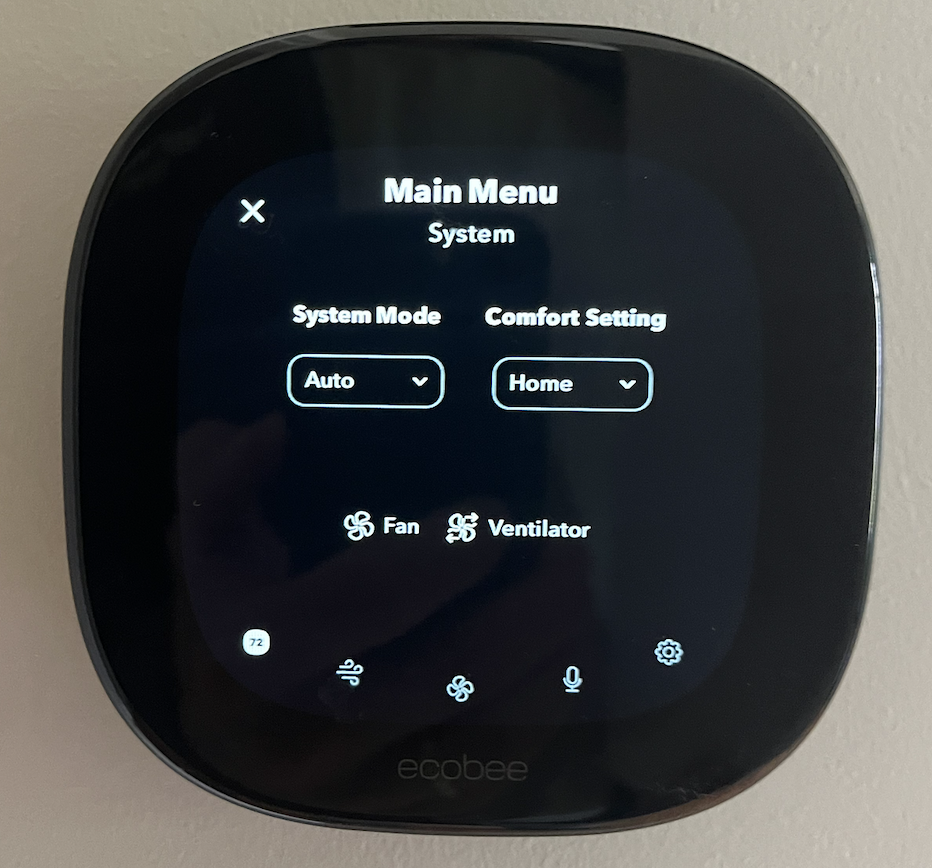
Main Menu Hamburger menu > System always shows what equipment is currently running. This can be useful to know if the ventilator, heater stage, fan, or cooling is running. The ventilator can always be turned off if it is running for any reason by with manual control as mentioned above.
Installation
Section titled “Installation”Here is a picture of an Ecobee baseplate configured to use the Harvest Night Cooling damper based on Ecobee’s concept of a Ventilator
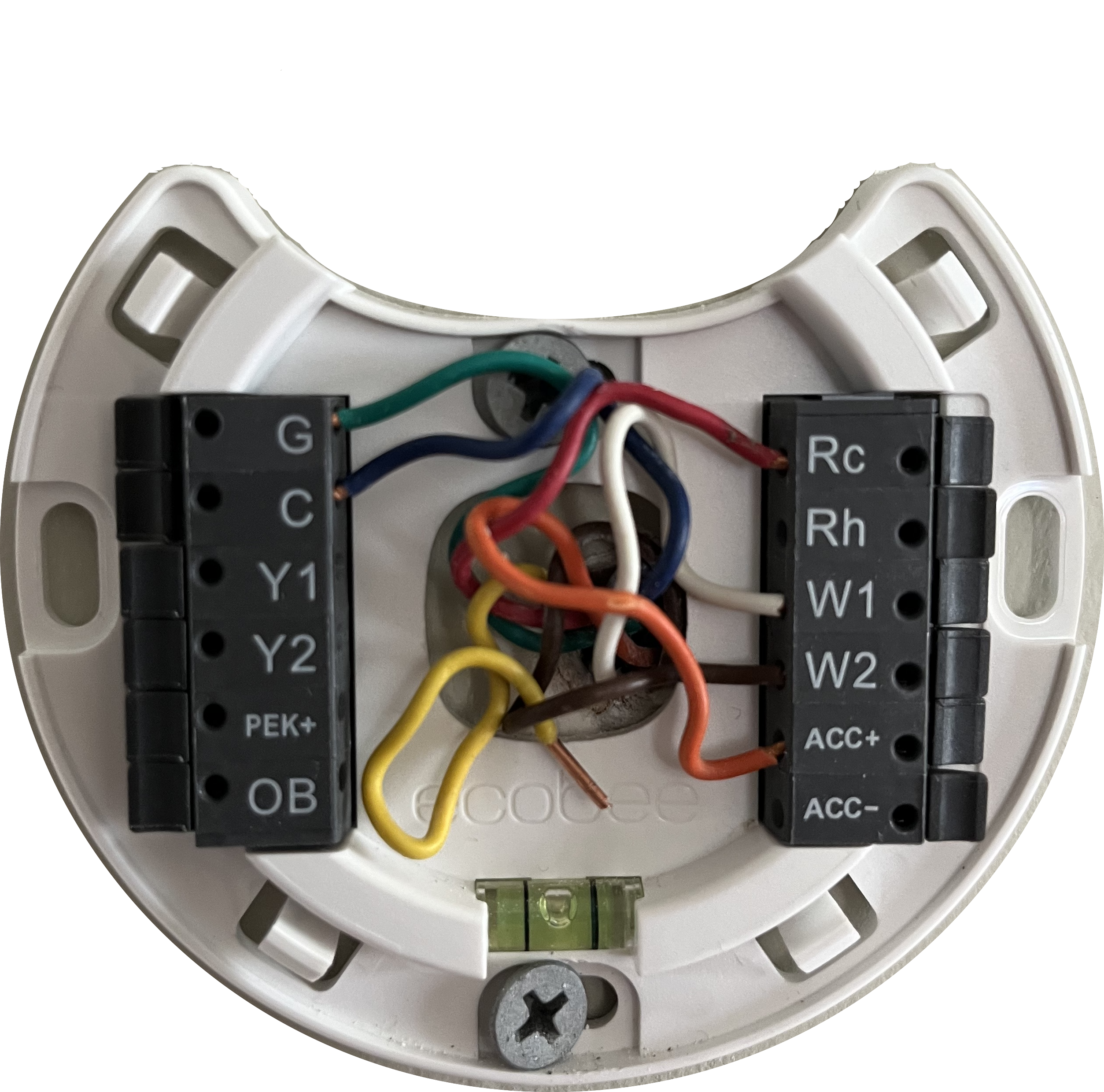
The minimum connections needed are G, C, Rc, W1, and ACC+.
- The ACC+ terminal (or PEK+ terminal for Enhanced) controls the ventilator at the thermostat.
- W2 is optional (stage 2 heating).
- Y1 will be connected if you also have an A/C outdoor unit for active cooling.
Software Configuration (on the Ecobee)
Section titled “Software Configuration (on the Ecobee)”Check the current configuration for a Ventilator
- Go to Main Menu Hamburger menu icon > General Settings icon > System
- If the ventilator is already setup, you will see Ventilator listed, and can move onto the Methods of Use
- If Ventilator is not listed, follow the instructions below to reconfigure the Ecobee to operate the ventilator.
Reconfiguring to enable Ventilator
- Go to Main Menu Hamburger menu icon > General Settings icon > Settings > Installation Settings > Equipment > Reconfigure Equipment, then navigate through the following instructions
- Click on I’m a homeowner, and choose Next
- Click on Only Rc is connected, and choose Next
- You will want the following wiring:
- G
- C
- Y1
- Rc
- W1
- W2 (optional, depending on whether you have a wire going to W2 terminal)
- We will manually configure the Y1 terminal if it is not already configured, so answer the question Is this correct? with No, and then press Modify
- Make sure G, Y1, W1 (and optionally W2) are selected, and press Next
- Answer Do you have an accessory installed? by choosing Ventilator, and choose Next
- Answer Do you have 1 wire or 2 wires coming from the accessory to the thermostat? by selecting 1 wire (ACC+) and choosing Next
- Choose your desired temperature units and choose Next
- Select Furnace for the kind of heating and choose Next
- Select By Furnace for the fan control and choose Next
- Answer What type of ventilator do you have? with Standard Ventilator and choose Next
- Select 0 for the minimum ventilator runtime while home is occupied. This can be changed later if needed, and choose Next
- Select 0 for the minimum ventilator runtime while home is unoccupied. This can be changed later if needed, and choose Next
- Answer Do you want to enable Free Cooling? with Yes, and choose Next
- Now you can use the back arrow at the top left of the screen to get back to the Main menu, and then choose to return to the main display