

Troubleshooting
Below are some checks you can perform if you have any issues with your system.
The Harvest Home App won't load
- Check that your phone or tablet has a working internet connection on the same network as the HarvestPod
- Make sure the Harvest Pod is powered on (see The system is off, or a component has no power).
- The Harvest Home App should be reachable from any web browser (on your home network) at HarvestPodXXXX, where XXXX is the HarvestPod S/N — credentials and S/N and are on the label under the Pod
- If the Pod was recently rebooted or reconnected to Wi-Fi, wait about 5 minutes and try again.
- If it still won’t load, contact Harvest Support (support@harvest-thermal.com or 510-962-6898, options 3, 2).
Connecting the Harvest Pod to a different Wi-Fi router
-
Make sure the Harvest Pod is powered on.
-
Connect your phone, tablet, or laptop to the Harvest Pod’s Wi-Fi access point. The network name (HarvestPodXXXX) and password are on the label on the bottom of the Pod. Wait at least 5 minutes after powering the Pod before connecting.
-
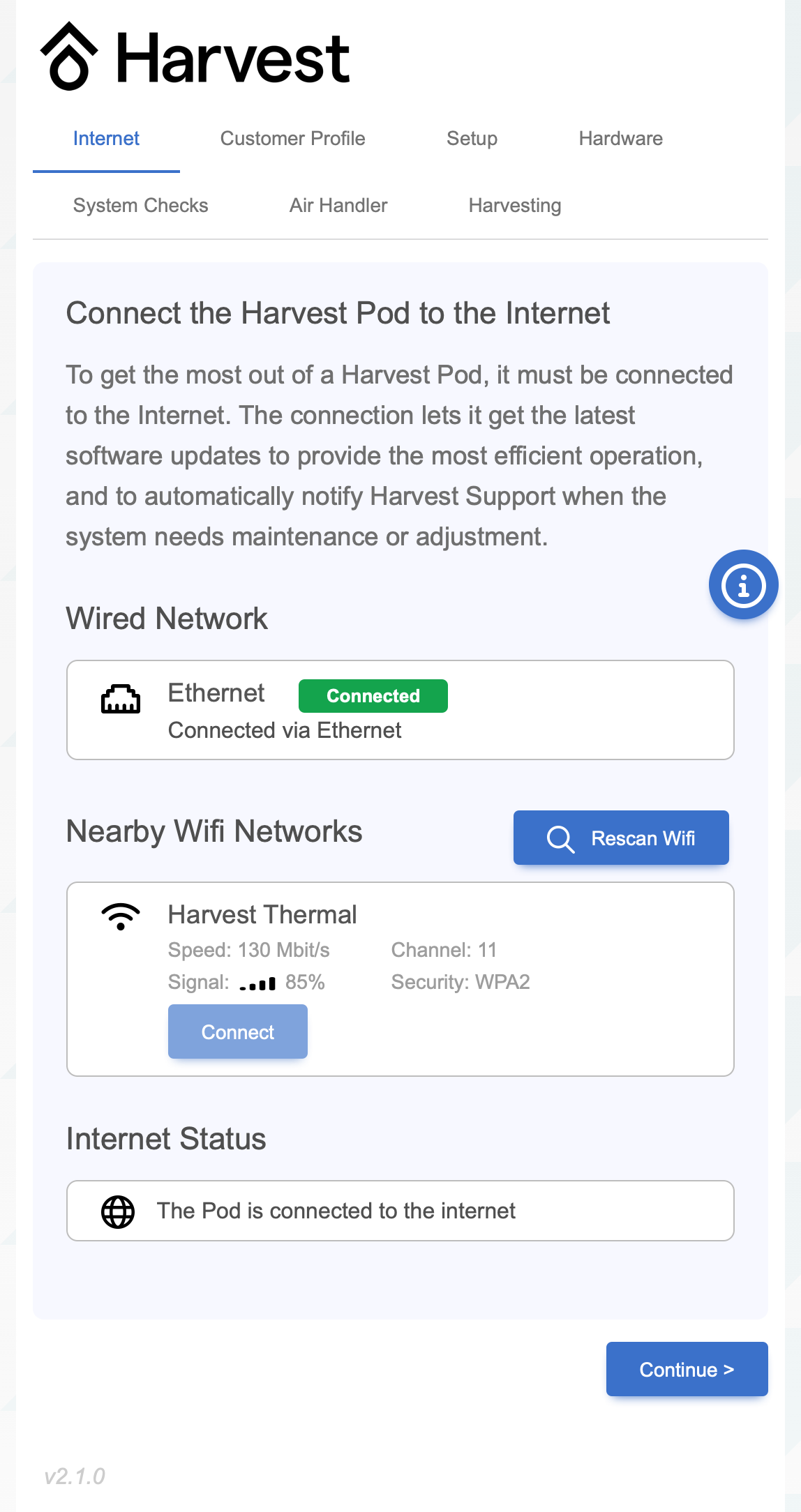
In a browser, go to
http://harvestpodXXXX.local(where XXXX matches the network name). -
Configure the internet connection and look for a green Connected indicator.
The system is off, or a component has no power
- Check that all devices are plugged in and their outlets have power:
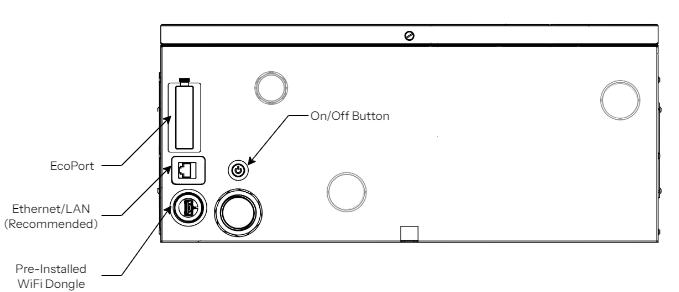
- The Harvest Pod power-button LED (underside of the Pod, on the left) is on.
- The SANCO2 heat pump water heater shows a small red “heartbeat” light on the left-hand side — this indicates it has power and no internal errors.
- The thermostat display is on. A thermostat with no power may mean the air handler is not powered.
- If any component has no power, check the circuit breakers. The SANCO2 (15 A) and any DX A/C outdoor unit (40 A) have dedicated breakers.
- Reboot the Harvest Pod: press the power button, wait ~1 minute, then press it again. If the power button isn’t accessible, the Pod’s breaker may be off or its power supply unplugged.
- To confirm the system is online and running, check the Harvest Home App.
No hot water, or the water isn't hot enough
- Check that the SANCO2 heat pump water heater and the Pod have power (see The system is off, or a component has no power).
- Carefully feel the three pipes exiting the top of the tank. If they are cold, re-check power to the SANCO2 and Pod.
- If you have recently used a lot of hot water (e.g. filling a bathtub), wait at least 20 minutes and try again.
- Check the state of charge in the Harvest Home App — a low charge means the system may still be recovering from heavy use.
- If the water is consistently not hot enough, the thermostatic mixing valve in the Pod can be adjusted — contact your contractor and Harvest Support (support@harvest-thermal.com or 510-962-6898, options 3, 2) at the same time.
Low airflow, or not enough heating/cooling
- With the thermostat calling for heating or cooling, check whether air is blowing from the vents. If not, the air handler may have no power (see The system is off, or a component has no power).
- If you just adjusted the thermostat, wait at least 20 minutes for the system to respond.
- Check that registers aren’t blocked by furniture, and that filters are clean — replace dirty filters.
- Heating can be slow if any of these are true:
- the thermostat is set above 72 °F;
- windows or doors are left open while the system is calling for heat;
- the home was left unheated for several days (it can take up to 24 hours to fully reheat);
- a lot of hot water was just used (heating may pause up to 30 minutes while the tank recharges).
A heat pump runs during time-of-use peak hours
Your comfort is the first priority of every Harvest system, so occasionally a heat pump may run during peak hours to keep up. You can minimize this by:
- Turning the thermostat down when leaving doors or windows open for extended periods during heating season.
- Limiting temporary thermostat changes during heating season to 2 °F or less at a time.
The SANCO2 shows an error code
If the display on the SANCO2 heat pump water heater shows an error code (one letter + one digit), note the code and contact your contractor and Harvest Support (support@harvest-thermal.com or 510-962-6898, options 3, 2) at the same time.
-
E9 — possible air lock in the SANCO2 circulator pump. Purge the SANCO2: open the bleed valve underneath the unit, bleed at high flow for at least 5 minutes (until no air is visible in the water), then close it.

SANCO2 bleed valve location (underneath the unit). -
H7 — wiring error with the tank temperature sensor:
- Check for cuts, defects, or rodent damage to the Cat5 cable between the Pod and the SANCO2.
-
For any other error code, contact the HVAC contractor.
Descaling
In hard-water areas, mineral scale can build up over time and reduce hot-water performance. The system may need periodic descaling. See the Descaling guide for the full procedure.
Issues with other units in the system (air handler, A/C, heat pump water heater, tank)
For issues relating to (or warranty on) individual units within the system — such as the air handler, air-conditioner heat pump, heat pump water heater, or hot water tank — refer to the manufacturer’s documentation and/or website for guidance.