
Thermal Battery System Start Up
System Commissioning with the Harvest Tech App
Section titled “System Commissioning with the Harvest Tech App”Power on the Harvest Pod.
Connect your phone/tablet/laptop to the Harvest Pod’s WiFi access point
- The network name (HarvestPodXXXX) and password can be found on the label on the bottom of the Pod
- Wait at least 5 minutes after powering the pod before attempting to access the Harvest Tech App.
Navigate to “http://harvestpodXXXX.local” using an internet browser, where “XXXX” is the same as the name of the network.
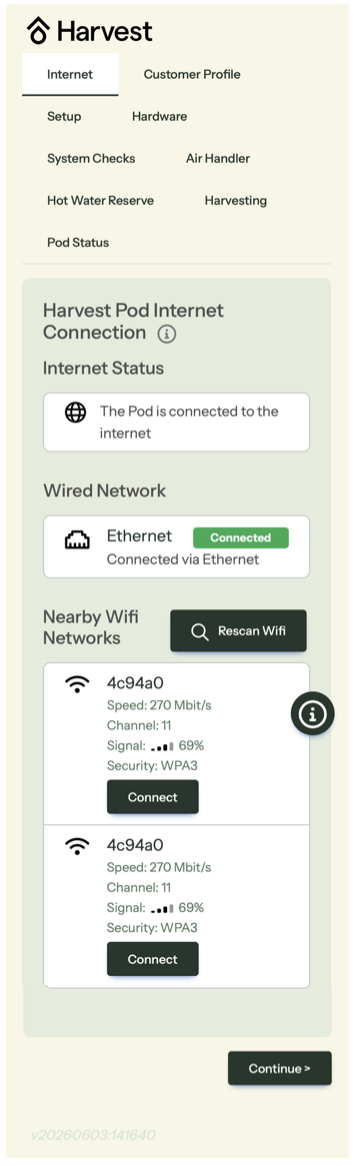
Configure the Internet Connection, and look for a green “Connected” indicator:
Fill in the customer profile and time zone (password can be found on the label on the bottom of the pod):

Setup the pod:
- Confirm you have installed the SANCO2 heat pump and the tank
- Fill in the correct Optional DX heat pump and Air Handler Protocol
- Tap “Apply”

Select the appropriate installed hardware:
- The generation can be found in the model number shown on the nameplate of the SANCO2.
- “Number of heat pumps” refers to the number of SANCO2 Heat Pump Water Heaters installed.
- F-SAN and T-SAN are optional sensors included in the Harvest Cold Weather Kit and/or the Twin SANCO2 Kit.

Check sensors and thermostat for proper function:
- Ensure all listed sensors are indicated as “OK”

Test the SANCO2 wiring:
- Select “Enable Manual Control”
- Toggle the SANCO2 on
The SANCO2 should turn on, and the power draw should read over 500 W. This will take 3-5 minutes.

Test the hydronic circulator pump to ensure it is fully purged of air:
- Ensure Manual Control is enabled.
- Enter 40 and select “Start”. The circulator pump inside of the Pod should turn on, and the app should display flow after 1-2 minutes.
- If no flow is displayed, check that the loop is fully purged and that all valves are open.

Configure the radiant flow rates:
Enter home Design Heating Temperature (99% coldest temperature in Farenheit) and heating load at the design temperature (in kBTU/h) in order to configure the hydronic variable heat output.

Configure Energy Harvesting
- Select Time of Use Control
- Select Utility Rate Schedule based on customers’ current or requested utility rate.
- Select “EcoPort is integrated into the pod.”